
Why?
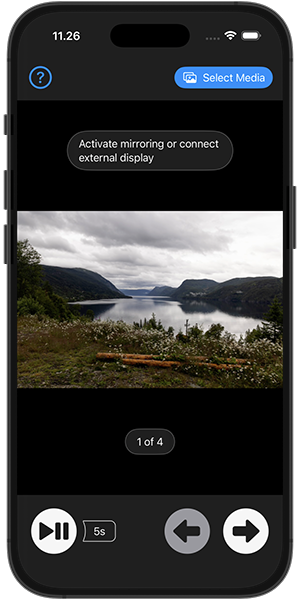
All my images and video end up in my iCloud Photos library and on a regular basis I want to be able to present the latest additions to friends and family via mirroring to a TV. While this is already possible via the Photos app, I don’t like having to swipe between images and especially I dislike that this is also the transition shown on the TV. I basically just want simple navigation via fairly large buttons and a nice fade transition.
Features
You get to choose the media to be presented via the standard Photos Picker and can either navigate the presentation via simple forward and back buttons or use autoplay with a defined interval. Screen mirroring needs to be setup outside the app via the control panel as this is not something that can be controlled from within an app. Alternatively an external display can be connected. Videos will start playback automatically, live photos will not but a play button is available.
App Store or not?
After implementing it to a degree that it worked well for my own usage the next question was whether to put it on the store. It was never meant (or suited) to be a paid app so that in itself is not a motivation but I guess that ever since the iOS App Store arrived, I’ve been thinking that surely I’ll put something up there in my own name one of these days. For a long time that did not happen, mainly due to prioritizing other stuff for my free time while having a day job that was all about coding. And initially after my retirement I wasn’t really that drawn to writing code - during the first 6 months it amounted to something like a 10 line shell script. But I decided that now is the time even though it does mean quite a bit of additional work. Not only preparing descriptions, meta data and screen shots for the store but also you need to provide links to a support page and a privacy policy, something that actually lead me to acquire this domain and set up a site. And of course there’s a lot of additional polishing to do when it’s suddenly meant for a broader audience but even for my own usage it’s nice to get rid of the rough edges.
If a tree falls in a forest…
As of this writing it has been more than a month since publishing, during which time I on purpose did not really tell anybody about it being available, just to check whether among the more than a 1.5 billion active iPhone users anybody would actually find it through regular App Store search. And as suspected basically nobody did - there’s been a total of 4 downloads, 2 immediately after publishing and another 2 right after making a small change in the screen shots, so most likely that probably wasn’t even done by real human beings. A total of 12 product page impressions. Obviously, this is not an app that everybody needs, and it might be tricky to set up the right keywords, but I have to conclude that, not surprisingly, App Store search is pretty much broken.
Challenges
For the best privacy experience I selected to use the standard Photos Picker, which means that the app will not need full access to the Photos library. This does bring a few limitations - for instance as this rules out access to any meta data, sorting by capture date is just not possible. Also there’s no simple way to select a full collection, this needs to be done via swipe selection which some users will not even know is a thing. Therefore the somewhat unfortunate need for an info panel in the app. Being based on SwiftUI you may think that obtaining the simple fade transition between images would be trivial - I can reveal that this is not the case at all. Also both video and live photo handling ended up needing embedded UIKit views. An annoyance that I currently can’t avoid is that after use a relaunch may trigger a system prompt to start AirPlay to the last device used for mirroring. Seems like a great feature but it only works for AirPlay streaming and has no effect in regards to mirroring.
Overall
I had fun implementing this and can now enjoy a nicely polished app for my own usage while still hoping that a few others might also benefit. I’ll possibly consider a few additional features, the most obvious one being pinch to zoom. Also crossing my fingers for Photos Picker improvements being announced at the upcoming WWDC.